


 Golam Rabiul Alam, PhD
Editorial note: The content on this website is provided for informational and educational purposes only and does not constitute professional legal, financial, or technical advice. See disclaimer below.
SaaS founders are leaking valuation by failing to protect their most visible asset: the user interface. When evaluating your total app patent cost, you can spend a year writing proprietary code, but if a competitor clones your UI pixel-for-pixel, copyright law alone will not stop them. In 2026, a design patent is one of the few legal tools built specifically to lock down interface cloning. Here is how to secure your app’s visual identity, use broken lines correctly in your drawings, and navigate the 2026 USPTO fee structure without burning your runway.
At A Glance
A design patent for a mobile app’s interface protects the ornamental look of your screens, not your code. The correct path for 2026 requires tying your GUI to a display screen, using solid and broken lines correctly in your drawings, and claiming Micro Entity Status to reduce fees by 80%.
Key Takeaways
- A design patent on a mobile app’s UI protects the visual appearance, not the backend code.
- You must tie your GUI to a physical object, an “article of manufacture” such as a display screen.
- The USPTO suspended the “Rocket Docket” expedited examination for design patents effective April 17, 2025, then formally cancelled the program by federal rule on August 14, 2025. Standard examination timelines of 12 to 18 months now apply.
- Your drawings are your claim: solid lines mark what is protected, broken lines mark surrounding context.
- Total official USPTO cost to patent a mobile app design in 2026 ranges from roughly $520 at Micro Entity status to roughly $2,600 at Large Entity status.
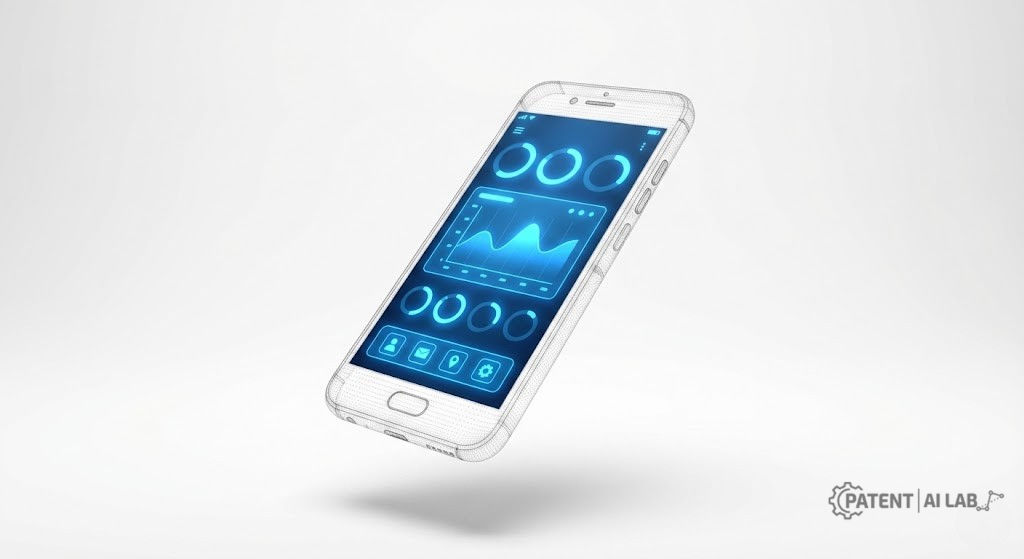
If you have built a unique interface, you do not want a competitor cloning your look pixel-for-pixel. Copyright protects your source code, but it often fails to stop lookalike apps that use entirely different code to achieve the same visual style. This is where a design patent on a graphical user interface (GUI) becomes a meaningfully stronger shield.
This guide walks through what’s involved in patenting a mobile app design under current 2026 USPTO rules, covering eligibility, drawing standards, and the fee structure. It is intended as a strategic overview, not a substitute for review by a licensed patent attorney, particularly once you are ready to file.
What a Design Patent for Mobile App UI Actually Protects
A design patent protects the visual ornamental characteristics of an article of manufacture. For software, this means:
- Layout of cards and buttons
- Icon arrangement and shapes
- Visual flow of a dashboard
- Ornamental surface styling
It does NOT protect:
- Your code (Swift, Kotlin, React Native)
The distinction trips up a lot of founders, so it’s worth seeing exactly where the patent boundary falls against real code. The annotated snippet below renders a typical onboarding screen. The comments mark which rendered elements would appear as solid lines in your patent drawing (claimed and protected) versus broken lines (disclaimed context) — because the same visual layout could be rebuilt in a completely different framework and the patent scope would not change at all.
// PATENT SCOPE ANNOTATION
// This code could render a patented screen, but a design patent
// protects only the rendered visual output below, never this code.
// Swap SwiftUI for React Native or Flutter and the claim is identical
// as long as the rendered layout matches.

VStack {
  // SOLID LINE in drawing -> CLAIMED: progress bar shape & position
  ProgressView(value: 0.33)

  // SOLID LINE in drawing -> CLAIMED: card layout, corner radius,
  // title/subtitle vertical rhythm (the ornamental arrangement)
  CardRow(title: "Personalize", subtitle: "Tailor your feed")
  CardRow(title: "Secure", subtitle: "Private by default")
  CardRow(title: "Ready", subtitle: "Start exploring")

  // SOLID LINE in drawing -> CLAIMED: button shape, corner radius
  // BROKEN LINE in drawing -> DISCLAIMED: the actual word "Continue"
  // (dynamic/localizable text is typically dashed out, not claimed)
  Button("Continue") { /* action */ }
}

// NOT shown in this snippet but relevant to the drawing:
// - device bezel, notch, status bar -> always BROKEN LINE
// - any username, avatar, or live data -> always BROKEN LINE
Notice what changed: the code itself never appears in a patent filing. What goes into the drawing is the rendered geometry the code produces, with each shape sorted into “claimed” or “disclaimed” before a single line is drawn. That sorting decision, not the code, is the actual patent strategy work.
- Backend logic or algorithms, which fall under utility patents instead
- Functional features, such as the underlying mechanics of a “tap to pay” function
Core concept: you are patenting the look of the screen, not how it works.
Clearing these three USPTO criteria is what separates an interface design that’s eligible for a patent from one that isn’t, directly impacting your overall app patent cost planning.
Three USPTO Eligibility Rules Every GUI Filing Must Clear
Clearing these three USPTO criteria is what separates an interface design that’s eligible for a design patent from one that isn’t.
The “Article of Manufacture” Requirement
A GUI cannot exist in a vacuum. It must be applied to an article of manufacture. You cannot simply patent a digital image; you must patent a display screen with a graphical user interface.
Strategic Move: The “Partial Design” Trick
Do not just patent your entire dashboard. If you have a unique menu button or swipe interaction, file a patent for just that specific element using broken lines for the rest of the screen.
Benefit: this prevents competitors from using your distinctive button in a totally different looking app.
Rule: if a line is solid, you claim it. If it is broken, you do not. Narrow claims, such as a single button, are often stronger than broad claims covering a full app.
Functional vs. Ornamental: Why This Distinction Decides Your Filing
If a specific design element exists only because it has to, such as a standard play-button triangle, it may be considered functional and ineligible. Your design needs ornamental choices: stylistic decisions that could have been executed differently.
The Single Claim Rule: Why Your Drawings Are the Entire Patent
Unlike utility patents, a design patent has only one claim.
- The claim text: “The ornamental design for a display screen with a graphical user interface, as shown and described.”
- The implication: your drawings are the claim. If your drawings are messy, your patent is worthless.
Drafting the Drawings: The Most Critical Step
Uploading raw screenshots is the leading reason for rejection. USPTO standards require high-contrast, black-and-white line drawings. Here is what that involves in practice.
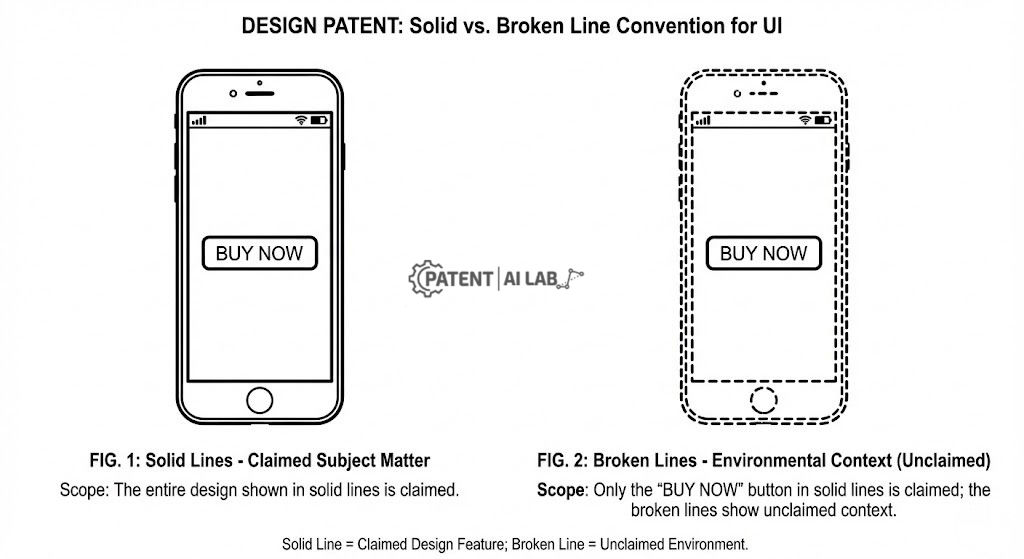
Solid Lines vs. Broken Lines: How Scope Control Works
This is how you define what you own versus what is just background context.
- Solid lines: indicate the elements you are claiming and protecting. If a competitor copies these exact shapes, they infringe.
- Broken or dashed lines: indicate elements that are disclaimed as context. This usually includes the physical phone outline, the status bar, or unimportant UI elements.
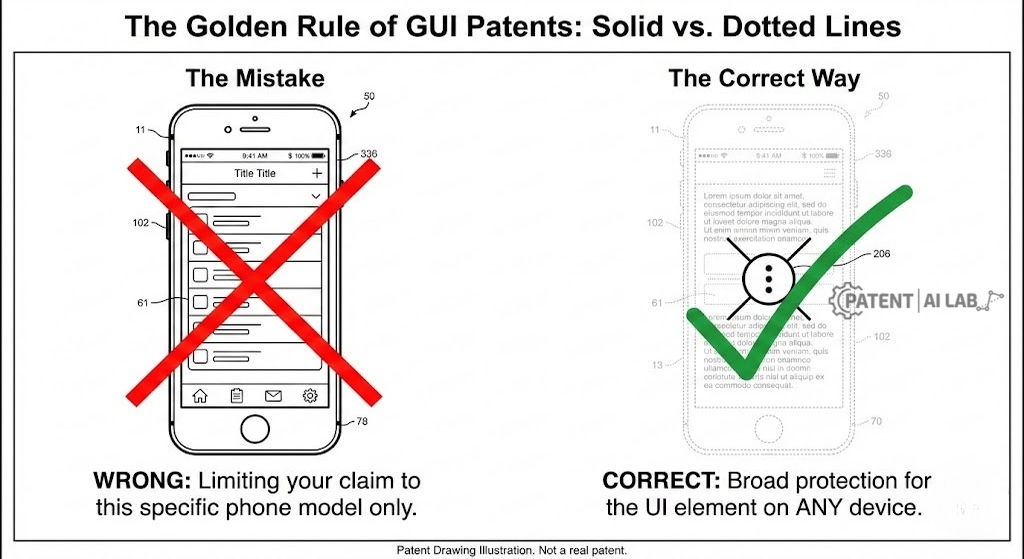
Strategy tip: use broken lines for the phone body, whether an iPhone or Android shape. This ensures your patent protects the UI on any device, not just the specific phone model drawn.
A quick way to stress-test a drawing before submission: ask whether each solid-line element would still look distinctive if every broken-line element around it were removed entirely. If a card layout only looks unique because of the phone bezel framing it, the solid lines probably are not narrow enough yet, and an examiner is more likely to find it functional rather than ornamental.
The “What to Dash” Cheat Sheet
Do not accidentally limit your own patent. Ensure these elements are drawn in broken lines as disclaimed context:
- The device body: avoid locking yourself to an iPhone 16 shape specifically; keep it generic.
- Status bars: WiFi, battery, and time indicators are not part of your design.
- Dynamic content: usernames, profile photos, and map data, unless the content is strictly static.
- Standard OS elements: the iOS “home bar” or the Android back button.
Five Steps to Convert a Screenshot Into a Compliant Drawing
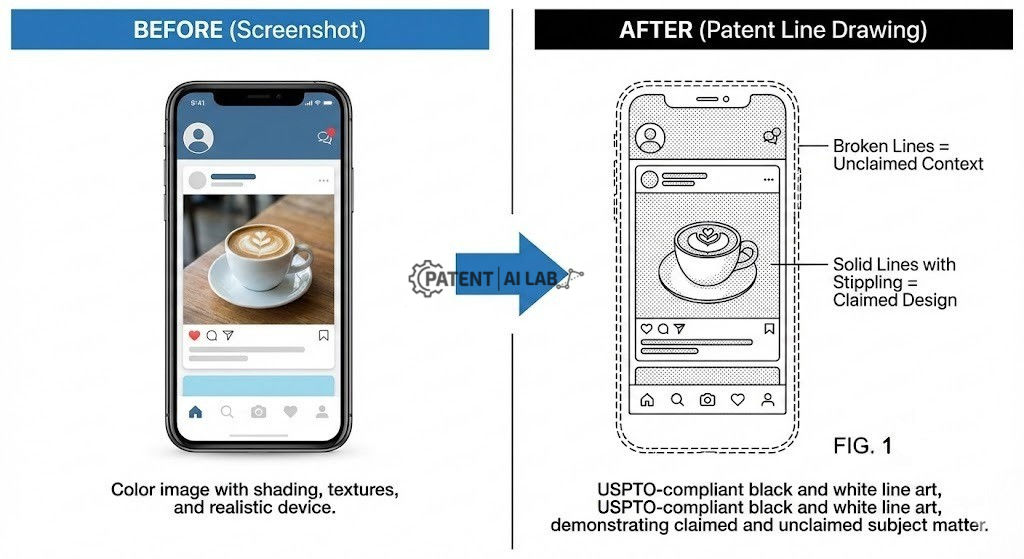
Do not upload a PNG straight from your phone. Follow this workflow instead.
- Capture: take a high-resolution screenshot of your app.
- Trace: use tools like Adobe Illustrator or Inkscape to trace the key UI elements into vector paths.
- Simplify: remove text unless the specific font style is itself the design, and replace generic images with simple geometric placeholders.
- Format: ensure lines are pure black, with no gray or color, on a pure white background.
- Views: prepare your figures in the standard sequence below.
- FIG. 1: front view, showing the main UI.
- FIG. 2 (optional): a transition state, used when filing a patent for an animated graphical user interface.
Designer’s workflow: from Figma to USPTO
Sending your patent illustrator colorful PNG screenshots increases legal fees, since they then have to trace everything manually. Send vectors instead:
- Select your UI frame in Figma.
- Turn off all shadows, gradients, and blur effects.
- Change all lines and text to #000000 (pure black).
- Export as SVG (Scalable Vector Graphics).
Sending SVGs lets your patent illustrator edit lines instantly, which can save roughly $200 to $500 in drafting fees and minimize your total app patent cost. If you want to speed up this tracing process, see our step-by-step guide on how to generate USPTO-ready patent drawings with AI.
Step-by-Step: How to File in USPTO Patent Center
Filing is done digitally through the USPTO Patent Center. Here is what the process looks like end to end.
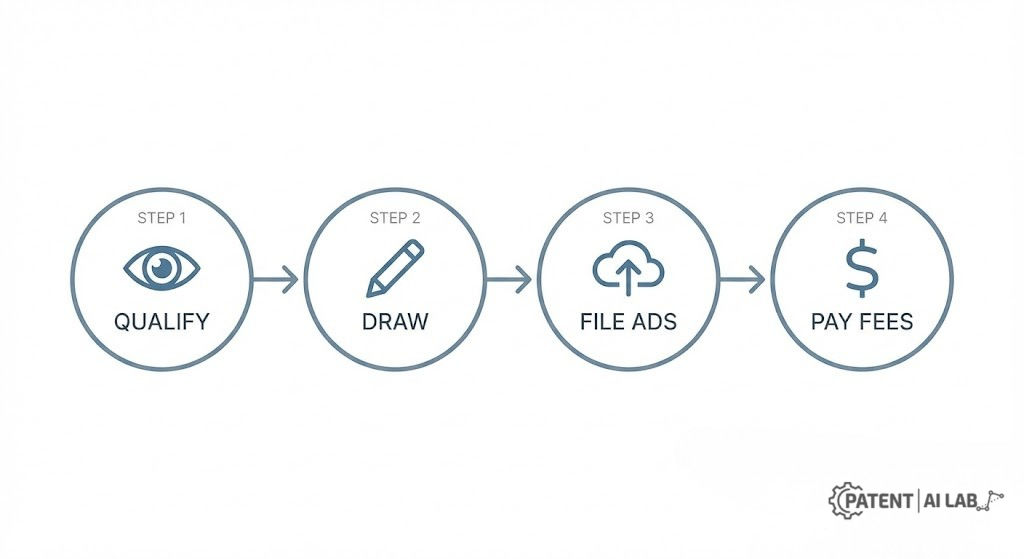
Step 1: Prepare Your Application Data Sheet (ADS)
This web-based form collects the legal metadata for your filing.
- Inventors: must be natural persons. No AI inventors are permitted.
- Applicant: usually your company, in the case of a SaaS startup.
- Entity status: check whether you qualify as a Small or Micro Entity to reduce fees.
The “Title Trap”
Never title your patent simply “Mobile App” or “Software.” The USPTO considers software intangible and unpatentable on its own.
You must use: “Display Screen with Graphical User Interface” or “Portion of a Display Screen with Icon.”
Step 2: Upload Drawings
Upload your PDF drawings, making sure they meet the strict margin and line-quality rules.
Step 3: Write the Specification
Keep it short. Design patent specifications follow a fairly fixed formula.
- Title: Display Screen with Graphical User Interface.
- Description of figures: “FIG. 1 is a front view of a display screen with a graphical user interface showing my new design.”
- Feature statement: “The broken lines showing the mobile device form no part of the claimed design.”
- Claim: “The ornamental design for a display screen with a graphical user interface as shown and described.”
Step 4: Pay Fees
Pay the basic filing, search, and examination fees immediately to avoid processing delays.
Your Actual App Patent Cost Breakdown in 2026
USPTO fees increased for design patents at the start of 2025, in part because design patents do not require maintenance fees the way utility patents do. The table below reflects the current 2026 schedule, confirmed directly against the official USPTO fee table.
| Fee Type | Large Entity (Standard) | Small Entity (Startups) | Micro Entity (Solo/Eligible) |
|---|---|---|---|
| Basic Filing Fee | $300 | $120 | $60 |
| Search Fee | $300 | $120 | $60 |
| Examination Fee | $700 | $280 | $140 |
| Issue Fee (Paid later) | $1,300 | $520 | $260 |
| Total Official Cost | ~$2,600 | ~$1,040 | ~$520 |
Founder’s Savings Alert: USPTO Micro Entity Status 2026
Most solo app developers and small founding teams qualify for Micro Entity Status, cutting USPTO fees by 80%. To qualify, you must meet the current USPTO micro entity gross income limit, confirmed at $251,190 as of the September 9, 2025 update. You must also not have been named as an inventor on more than four previously filed patent applications.
Large entities pay: ~$2,600
Micro entities pay: roughly $520
Cost breakdown: $520 spread across 15 years works out to about $34.66 a year, under $0.10 a day to protect your UI.
For a deeper breakdown of hidden legal fees and international filing costs, see our full analysis of US vs UK Software Patent Cost: Which is Cheaper for Startups?
Real-World Implications for Startups & SaaS
Intellectual Property Protection for SaaS
For SaaS founders, a design patent functions as a strategic asset. It helps prevent clone apps from confusing your customers, and holding a design patent on a distinctive UX can be a meaningful signal of defensibility during fundraising conversations.
Why the “Rocket Docket” Is Permanently Gone
Expedited Examination, known informally as the Rocket Docket, was popular in the years before 2025. The USPTO suspended the expedited examination procedure for design patent applications under 37 CFR 1.155 effective April 17, 2025, citing a 560 percent surge in requests, much of it tied to fraudulent micro entity certifications that were straining examination resources. The USPTO then formally cancelled the program through an amended federal rule announced August 14, 2025, so it is not coming back in its old form. Applicants who relied on the Rocket Docket for fast turnaround now need to plan around the standard 12 to 18-month examination timeline, with one narrow exception: a design application can still be made special, at no fee, if an inventor is 65 or older or has a qualifying health condition.
What the 2025 AI Inventorship Guidance Means for App Designers
If you used Midjourney, ChatGPT, or any generative tool to help design your UI, be careful about how you document the process. The USPTO’s revised inventorship guidance, issued November 28, 2025, reaffirms that AI cannot be an inventor: AI systems are treated as tools, comparable to laboratory equipment or design software, rather than as creative collaborators. What matters legally is conception, defined as the formation in a human mind of a definite and permanent idea of the complete design. A human must be able to describe how they shaped that conception, whether through specific prompts, the selection and arrangement of generated options, or post-processing refinement, in order to be properly listed as the inventor.
Pro Tip: Virtual Patent Marking for Apps
Since you cannot stamp a patent number directly on software code, use Virtual Marking to put competitors on notice. This is a meaningful step toward establishing willful infringement if someone copies your UI later, which can affect available damages in litigation. Consider placing the notice in a few places:
- Splash screen: small text at the bottom, such as “Patent Pending.”
- App store description: a line such as “Design protected by U.S. Patent D123,456,” used only after the patent grants.
- Settings menu: an “About” or “Legal” tab listing your IP status.
Curious about the exact costs and waiting periods for other modern patent processing routes? Read our complete breakdown of the USPTO Track One fee and timeline.
Design Patent vs. Copyright: Which One Actually Stops a Clone?
Where Interface Protection Is Headed After 2026
- Animated GUIs: patents covering animated transitions between screens are growing in popularity as motion design becomes more central to UX.
- Virtual and augmented reality: the definition of “screen” is expanding to include projected interfaces used in spatial computing.
Worked Example: Applying the Rules to a Hypothetical Screen
The rules above are easiest to internalize against one concrete screen rather than abstract categories. Below is a hypothetical example, not a real granted patent, walked through step by step the way an applicant would actually approach it.
The screen: a fitness app’s weekly summary dashboard, with three stacked progress rings, a horizontal date selector, and a single “Share” button in the bottom corner.
- Identify the genuinely ornamental choice. The three stacked rings could have been three bars, three numbers, or three pie charts. Because the designer chose rings specifically, and arranged them in that vertical stack rather than side by side, that arrangement is a candidate for protection.
- Separate it from anything functional. The percentage numbers inside each ring are dynamic data, not design, so they get drawn in broken lines or omitted. The ring shape and stacking order stay solid.
- Decide the claim’s width. Filing on the full dashboard (rings, date selector, and button together) gives one broad claim that is easier for a competitor to design around by changing just one element. Filing on the ring stack alone, per the Partial Design strategy above, gives a narrower but harder-to-circumvent claim.
- Draw the disclaimers. The phone bezel, status bar, the date selector (if not part of this particular claim), and the home indicator bar all go in broken lines, exactly per the cheat sheet earlier in this guide.
- Write the one-sentence claim. Even for this narrow filing, the claim text does not change: “The ornamental design for a display screen with a graphical user interface, as shown and described.” The drawing, not the wording, is what defines the ring stack as the protected element.
This walkthrough is illustrative only. A real filing on a screen like this would still need a patent attorney to confirm the ring arrangement clears the functional-vs-ornamental test on its specific facts, since that determination depends on details (such as whether a ring shape is the only technically sensible way to show three percentages at once) that vary case by case.
Podcast
Note: This audio is a condensed summary. Please refer to the written text for precise legal definitions and 2026 fee schedules.
FAQs
What’s the fastest way to patent a GUI in 2026?
The USPTO suspended the ‘Rocket Docket’ expedited examination for design patents effective April 17, 2025, and formally cancelled the program by federal rule on August 14, 2025. The fastest practical way now is to ensure your initial filing is completely error-free to avoid office action delays.
Can I patent a mobile app design if AI helped generate it?
Yes, provided a human inventor contributed significantly to the conception of the design. Under the USPTO’s revised inventorship guidance issued November 28, 2025, AI is treated as a tool, similar to design software, not as an author or co-inventor.
How do I reduce the USPTO fees?
If you have a gross income under $251,190 and have been named as an inventor on fewer than 4 previously filed applications, you likely qualify for Micro Entity Status, which reduces fees by 80%.
Do I need to show the phone in the drawings?
Yes, typically in broken lines. This satisfies the “Article of Manufacture” requirement by showing the design is applied to a screen, without limiting your rights to just that specific phone model.
How long does a design patent last?
A U.S. design patent lasts 15 years from the date of the grant. Unlike utility patents, there are no maintenance fees.
Sources and Legal References
The fee schedules, timeline updates, and entity eligibility requirements discussed in this strategy guide are based directly on the latest federal directives:
- 1. USPTO Fee Schedule (Effective January 19, 2025)
The official fee schedule confirming current design patent filing, search, examination, and issue fees across Large, Small, and Micro Entity status.
Review USPTO Fee Schedule - 2. USPTO Micro Entity Status Parameters
The federal parameters establishing the $251,190 maximum qualifying gross income limit, current as of September 9, 2025, for the 80% filing discount.
Review Micro Entity Requirements - 3. USPTO Notice: Suspension of Expedited Examination of Design Patent Applications
The official April 14, 2025 notice suspending the design patent Rocket Docket under 37 CFR 1.183, effective April 17, 2025.
Review USPTO Suspension Notice
Disclaimer & Legal Notice
This article reflects the author’s perspective evaluating intellectual property frameworks and USPTO administrative structures from a strategic and technical standpoint. It is intended strictly for informational and educational purposes and does not constitute formal legal advisory services. It is not a substitute for the advice of a qualified, licensed patent attorney. USPTO fee schedules, entity status limits, and patentability parameters change frequently. Always consult a certified legal counsel before filing an application or initiating prosecution.


1 comment