


 Golam Rabiul Alam, PhD
Most founders believe generating patent drawings with AI is as simple as typing a prompt and downloading the result. It is not. Submitting raw Midjourney or DALL·E 3 outputs directly into a USPTO filing is a reliable path to an Office Action objection. Examiners enforce the 300 DPI resolution rule and reject drawings that carry faint grayscale blurring, pixelated edges, or inconsistent line weights — all telltale signatures of unprocessed AI image output. If your drawings do not satisfy the vectorization standards and margin specifications mandated by 37 CFR § 1.84, your application stalls while competitors move forward. This guide lays out exactly what compliant AI patent drawing generation requires in practice.
At A Glance
AI tools can draft a usable starting figure in minutes, but the raw output is never filing-ready. Three things stand between a generated image and a USPTO submission: a tightly constrained prompt that suppresses shading and perspective, vectorization in a tool like Illustrator or Inkscape to produce solid black lines and uniform stroke weight, and a final human check against 37 CFR § 1.84 for margins, numerals, and resolution. Skip any one of the three and the most likely outcome is an OPAP objection, not approval.
Key Takeaways
- AI is a drafting accelerator, not a compliance shortcut
- Prompt precision determines whether output is art or a legal drawing
- Vector cleanup is mandatory before any USPTO submission
- 37 CFR § 1.84 rules have zero tolerance for artistic shading or grayscale
- Human review remains non-negotiable regardless of AI tool used
Why Patent Drawings Still Matter
Patent drawings are not decoration. Under 35 U.S.C. § 113, drawings are required whenever they are necessary for understanding the claimed invention, and in practice that covers almost every utility patent application involving a physical device, circuit, or mechanical system. They are legal evidence, part of the written disclosure, and what courts and examiners rely on to determine the scope of protection.
At the USPTO, drawings often decide how broadly claims are interpreted, whether an examiner can follow the invention’s logic, and whether a design patent survives rejection. AI changes how drawings are created, not why they matter. A startup that files AI-generated drawings without proper vectorization is not saving time; it is trading a quick draft for a Notice to File Corrected Drawings and a two-month response deadline.
If your drawings violate USPTO rules, the application can be objected to even if the invention itself is strong. Before spending hours generating drawings, make sure your invention is actually unique. Run a quick check using our Lens.org Free Patent Search Guide.
Properly formatted drawings are essential for protecting your intellectual property and ensuring your claims are enforceable.
⚠️ Current Enforcement Note
The USPTO’s Office of Patent Application Processing (OPAP) enforces the 300 DPI minimum resolution requirement and rejects drawings that exhibit grayscale blurring or pixelated edges caused by direct, unedited outputs from generative image tools. Per the USPTO Patent Center PDF Guidelines, scanned drawing files must meet a minimum of 300 DPI, and the office strongly recommends lossless formats. Proper vectorization is not optional; it is a filing requirement.
USPTO Patent Drawing Requirements (Plain English)
Before selecting any AI tool, you need a firm grasp of the rules every drawing must satisfy. These are codified in 37 CFR § 1.84 and enforced by OPAP before examination even begins. Most of these rules exist because patent drawings were standardized in an era of pen, ink, and photostat reproduction, and the regulation never fully caught up to digital generation — which is exactly why generative AI output collides with it so often. An AI model has no concept of “what survives photocopying” or “what a clerk needs to measure with a ruler”; it optimizes for something that looks convincing on a screen, not something that satisfies a century-old reproduction standard. The table below maps each rule to what it actually means when you’re staring at an AI-generated image deciding whether it needs more work.
Core USPTO Drawing Rules (Utility & Design)
Of these six rules, the line-thickness and shading requirements cause the most friction with AI output specifically. Diffusion-based image models are trained on millions of photographs and illustrations where depth, light, and texture are the entire point — so even a heavily constrained prompt will often sneak in a faint gradient at the edge of a curve or a slightly tapered line where it meets another. That artifact is invisible at thumbnail size on your screen and immediately visible to an examiner reviewing a printed sheet at full resolution.
Required Margins (37 CFR § 1.84(g))
These margins apply to every sheet of drawings without exception. Margin violations are among the most frequently cited OPAP objections precisely because AI-generated outputs are rarely sized to USPTO paper specifications by default — most generators default to square or 16:9 canvases meant for screens, not the fixed US Letter or A4 sheet that Patent Center expects. Catching this early matters: a margin problem is purely mechanical to fix in Illustrator or Inkscape by setting the correct artboard size before you ever touch the drawing itself, but it’s easy to miss if you only check the figure and never check the page it sits on.
Are AI Patent Drawings Legally Acceptable?
Yes, but with firm limits. The USPTO does not prohibit AI-generated drawings. However, the applicant remains fully legally responsible for compliance, the output must meet the same standard as hand-drafted illustrations, and copyright questions require careful attention. AI is treated like a drafting instrument, not an inventor or original author.
Consider a practical scenario: a medtech startup uses DALL·E 3 to generate a draft figure of a surgical clamp mechanism, exports it as a PNG, and attaches it directly to their nonprovisional application. OPAP flags the drawing for grayscale pixels and inconsistent stroke weight under § 1.84(l). The applicant receives a Notice to File Corrected Application Papers with a two-month deadline, pays additional attorney fees for corrected drawings, and delays their filing date’s examination cycle by a full quarter. The fix, proper vectorization before filing, would have taken two hours.
Remember, AI is a tool, not an inventor. Relying too heavily on automation can lead to legal rejections, as we discussed in ChatGPT vs. Dedicated Patent AI Risks.
Tools You Need: The Current Stack
No single tool covers this workflow end to end, and that’s by design rather than a gap in the market. Generation tools are optimized to interpret a prompt and produce a convincing image quickly; they are not built to enforce a federal drawing standard, and treating them as if they were is the single most common mistake first-time filers make. Compliance and cleanup tools, in turn, were never meant to generate geometry from a text description — they exist purely to take whatever raster image you feed them and turn it into the clean, uniform vector paths that § 1.84 demands. Knowing where one tool’s job ends and the next one’s begins is most of the battle.
AI Generation Tools (Concept to Draft)
- DALL·E 3 — strong technical prompt adherence via the ChatGPT interface; cloud-processed, so inputs are stored on OpenAI servers
- Midjourney — use only with extremely strict prompts; its default artistic bias toward shading and texture creates significant cleanup overhead
- Stable Diffusion (local) — recommended for privacy-sensitive or confidential inventions where data cannot leave your infrastructure
For secret or highly sensitive inventions, only use locally hosted Stable Diffusion, never a public server API. Prompts submitted to cloud-based services are retained and may be processed by the provider — a real consideration before your nonprovisional application is even filed, since an invention disclosed to a third-party server is a different question from one disclosed publicly, but still worth treating cautiously if confidentiality matters to your filing strategy.
While AI automation accelerates drafting, it does not replace the human oversight needed for compliance.
Cleanup & Compliance Tools
- Adobe Illustrator — industry standard for Image Trace vectorization and stroke normalization
- Vectorizer.ai — fast raster-to-SVG conversion for simpler line drawings
- Inkscape — capable open-source alternative with full path editing
Prompt Engineering: The Core Skill
The gap between a usable patent figure and an unusable AI image almost always originates in the prompt. Generative models default toward visual richness — shading, perspective, texture, artistic line variation — precisely the properties that 37 CFR § 1.84 prohibits. Constraining those defaults explicitly is the entire craft of USPTO-safe prompt engineering.
USPTO-Safe Prompt Formula
Technical line drawing of [object],patent illustration style,black and white,white background,solid black lines only,no shading,orthographic view,labeled parts with reference numerals,high contrast,USPTO utility patent compliantExample: Mechanical Invention
Technical line drawing of a foldable drone arm hinge mechanism,patent style,black and white,exploded view,solid black lines,no shading,white background,labeled parts with numerals,clean vector appearanceNotice that the prompt explicitly forbids shading and specifies orthographic or exploded view geometry. AI models will otherwise default to perspective rendering and artistic shadow gradients, both of which require extensive cleanup before the image approaches § 1.84 compliance.
Convert Sketch to Patent Drawing: The AI Workflow
- Hand sketch on paper or tablet, focusing on functional accuracy over aesthetics
- Photograph or scan at high contrast (300 DPI minimum)
- Feed into AI with a “line refinement” prompt that constrains style while preserving your geometry
- Export as PNG or SVG for downstream vectorization
- Vectorize and clean manually in Illustrator or Inkscape
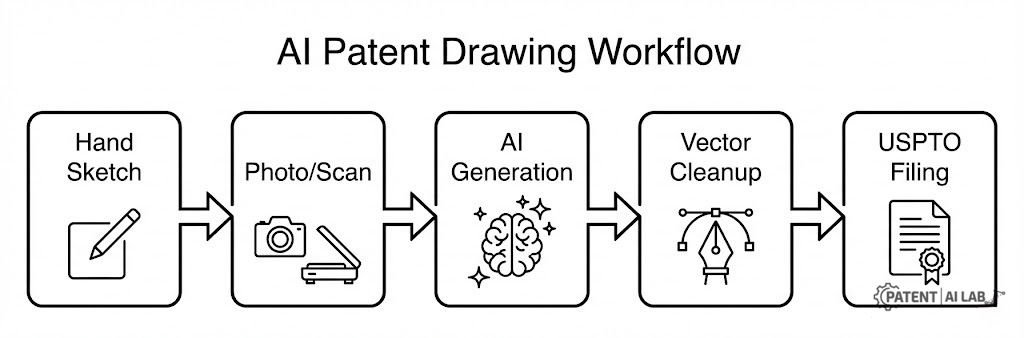
This hybrid approach drastically reduces AI hallucination. When the AI refines an existing human sketch rather than generating geometry from scratch, it cannot invent components, alter proportions, or misrepresent mechanical relationships. The human sketch is the factual anchor; the AI is the line-quality tool.
Before vs. After: The AI Impact
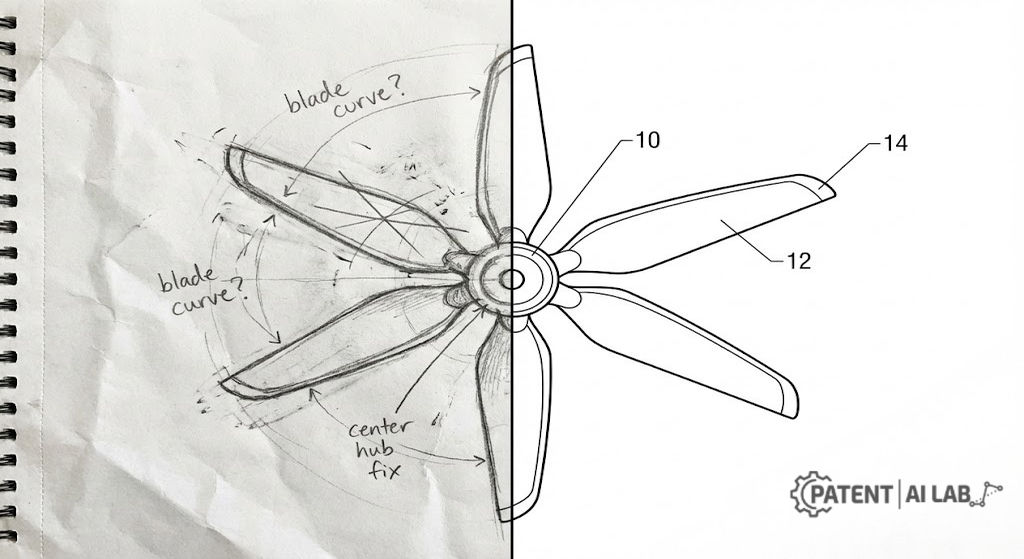
Before (Manual Process): Rough pencil sketch, uneven lines, no consistent proportions.
After (AI-Assisted): Clean black vector lines, exploded view clarity, USPTO margin compliance.
Refining & Vectorizing: The Critical Step
AI output alone is rarely submission-ready. Every drawing requires vector cleanup before filing, and skipping this step is the single most common reason AI-assisted patent applications receive drawing objections from OPAP.
Vector Cleanup Checklist
- Remove all gray pixels by thresholding to pure black and white
- Normalize stroke width to a consistent, uniform weight throughout the drawing
- Snap all angles to true orthographic geometry, eliminating freehand curve artifacts
- Place and align reference numerals at minimum 0.32 cm height, positioned outside drawing elements with clear lead lines
Adobe Illustrator Steps
- Open AI-generated PNG; run Image Trace using the Black and White Logo preset
- Expand the tracing to convert to editable vector paths
- Delete background artifacts and stray anchor points
- Set all strokes to a uniform width; verify line weight survives reduction
- Export as PDF with correct USPTO paper size and margin artboard settings
Utility vs. Design Patent Drawing Standards
Design:Protects strictly the visual ornamentation, surface aesthetics, and overall physical appearance.
Design:Demands a complete set of multi-angle orthographic views (front, back, top, bottom, sides) to define the full 3D boundary.
Design:Critically important and highly scrutinized; used to clearly define the boundaries of claimed versus unclaimed visual features.
Design:Highly encouraged and strictly regulated by examiners to clearly illustrate surface depth, contour variations, and texture.
Design patents demand the highest drawing precision of any USPTO filing type. Because the drawings define the legal scope of the design claim, even a single misrepresented contour line can limit enforceability or invite a rejection. AI accelerates the initial draft, but manual correction is unavoidable before any design patent submission. This is also where AI tools struggle most: the broken-line convention that separates claimed ornamental features from unclaimed environmental context is a legal signal, not a visual style choice, and no generative model currently understands that distinction without explicit, line-by-line human direction.
AI Tools Comparison
The table below ranks each tool by how much manual cleanup it tends to require before a drawing can satisfy § 1.84 — not by general image quality, which is a separate question. A tool can produce beautiful, photorealistic output and still rank poorly here if that quality comes from exactly the kind of shading and gradient work that the USPTO won’t accept.
Cost of Patent Drawings: What You’re Actually Paying For
We’re deliberately not publishing dollar figures here. Patent draftsman pricing varies by firm, region, figure complexity, and how many views a single invention requires, and we don’t have a current, sourced dataset we’d be comfortable standing behind for budgeting purposes. A stale or unsourced number is worse than no number at all if you’re using it to plan spend — so instead, here’s how the three approaches actually compare in what they buy you, which is the part that doesn’t change month to month.
For an actual budget, request a written quote from a draftsman firm for your specific figure count, or estimate freelancer/tool costs based on current marketplace listings for your exact drawing type — both will be more accurate than any general number we could publish here, and neither requires guessing.
The number that matters most isn’t the per-figure cost anyway — it’s the cost of getting it wrong. An OPAP objection requiring corrected drawings and an attorney response will, in nearly every case, cost more in fees and lost time than proper vectorization would have cost at the outset. Treat the cheapest option as cheap only if you also have the time and § 1.84 familiarity to do the compliance review yourself.
USPTO Checklist (Pre-Filing)
- Black and white only — no grayscale, no color (absent a granted petition under § 1.84(a)(2))
- Correct margins on every sheet: top 2.5 cm, left 2.5 cm, right 1.5 cm, bottom 1.0 cm (§ 1.84(g))
- Reference numerals consistent with specification and legible at minimum 3.2 mm (1/8 inch) height (§ 1.84(p))
- No descriptive text inside drawings beyond essential catchwords (§ 1.84(o))
- PDF resolution minimum 300 DPI per USPTO Patent Center PDF Guidelines; no password protection; no multimedia layers
- Human-reviewed by someone familiar with § 1.84 before submission
Common Examiner Objections (Avoid These)
These four objections appear in OPAP notices with regularity when AI-generated drawings enter a filing without cleanup:
- “Improper shading” — AI defaults to gradient fills and halftone texture that § 1.84 prohibits; eliminate during vectorization
- “Inconsistent line thickness” — generative models vary stroke weight for artistic effect; normalize all strokes to uniform width
- “Unreadable numerals” — AI-placed labels are often too small or embedded in shading; manually position numerals at the required minimum size
- “Perspective view without orthographic support” — AI strongly prefers perspective; add plan, elevation, or section views as the primary disclosure
Where This Is Headed
It’s worth being honest about how much of this is observable trend versus speculation. Two things are verifiable today: OPAP’s current objection criteria under MPEP § 507 do not distinguish based on how a drawing was produced, and the agency has not published guidance creating a separate review track for AI-assisted drawings. Everything past that point is informed projection, not established fact.
What’s plausible, based on current adoption patterns:
Hybrid workflows — AI for the first draft, mandatory human vectorization before filing — are likely to remain the practical default for cost-conscious applicants, simply because they’re already the only approach that reliably clears § 1.84 today. Purpose-built drawing tools that bake in compliance checks are starting to appear, though none has yet been endorsed or recognized by USPTO itself.
What to watch for:
Fully automated, unreviewed AI drawing submissions have no path to acceptance under the current rules — that part isn’t speculative. What’s less certain is how quickly examiners’ ability to spot characteristic AI artifacts will improve, and whether USPTO will eventually issue drawing-specific guidance for AI-assisted filings the way it has for AI-assisted claim drafting. Until then, treat the current §1.84 rules as the only standard that matters.
Podcast
Note: This audio is a condensed summary. Please refer to the written text for precise legal and compliance definitions.
FAQs
A few questions come up repeatedly from founders going through this process for the first time:
Can I submit AI-generated drawings directly to USPTO?
Yes, but only if they fully comply with 37 CFR § 1.84. Raw outputs almost always fail without vectorization and gray-pixel removal. Submitting unprocessed AI images risks a Notice to File Corrected Application Papers and a two-month response deadline.
Does USPTO care who made the drawings?
No. The USPTO cares entirely about compliance with § 1.84: clarity, solid black lines, correct margins, and legible reference numerals. Origin is irrelevant; the applicant bears full responsibility for what is submitted.
Can AI replace a professional patent draftsman?
Partially. AI replaces the initial drafting cost and significantly compresses turnaround time. It does not replace the legal accountability, vectorization cleanup, and § 1.84 compliance review that precede a valid USPTO submission.
Are color drawings allowed?
Only under limited circumstances after filing a formal petition under 37 CFR § 1.84(a)(2) explaining why color is necessary. The petition must be granted before color drawings can be submitted. Avoid color unless there is genuinely no other way to disclose the invention adequately.
Sources and Legal References
The drawing compliance standards, margin requirements, and rejection criteria discussed in this guide are mandated by federal regulation and the official examination protocol:
- 1. USPTO — 37 CFR § 1.84 (Standards for Drawings), eCFR current text
Authoritative federal regulation governing all patent drawing requirements including mandatory black-and-white ink rules, margin specifications, reference numeral sizing, and prohibition of grayscale. Last amended 3/30/2026.
View 37 CFR § 1.84 on eCFR - 2. USPTO — MPEP § 507: Drawing Review in the Office of Patent Application Processing
Official OPAP review criteria specifying the exact conditions under which drawings are objected to, including line quality, missing lead lines, margin violations, and color drawing rules. Verifies the objection categories described in this article.
View MPEP § 507 - 3. USPTO — Patent Center PDF Guidelines (Official Filing Requirements)
Establishes the 300 DPI minimum resolution requirement for scanned drawing files submitted via Patent Center, and specifies prohibited PDF features including password protection and multimedia layers.
View USPTO Patent Center PDF Guidelines - 4. USPTO — Legal Framework for Patent Electronic System (September 2025)
Current official framework document confirming that PDF files created from scanned documents submitted via the Patent Electronic System must meet a minimum 300 DPI resolution requirement per 37 CFR 1.52(a)(1)(v).
View USPTO Legal Framework PDF (September 2025) - 5. USPTO — Nonprovisional (Utility) Patent Application Filing Guide
Official filing guide confirming that black and white drawings are normally required and that India ink or equivalent producing solid black lines must be used, with hand-drawn drawings scanned to PDF for Patent Center submission.
View USPTO Utility Patent Filing Guide
Disclaimer & Legal Notice
This article reflects the author’s perspective evaluating AI drafting technologies from a strategic and technical standpoint. It is intended strictly for informational and educational purposes and does not constitute formal legal advisory services. It is not a substitute for the advice of a qualified, licensed patent attorney. Drawing requirements are complex and strict. Always consult a certified patent attorney before submitting any illustrations to the USPTO.


Add comment