


 Golam Rabiul Alam, PhD
Editorial note: This article evaluates commercial IP software and USPTO examination trends for informational purposes only. It is not legal advice. See disclaimer below.
Manual office action responses eat billable hours that firms can no longer afford to lose. Associate attorneys downloading PDFs and hand-copying claim identifiers from PAIR is a workflow most practices are actively trying to retire by deploying modern ai tools for uspto office action responses. Generative AI for patent prosecution has moved from basic template generation to genuine legal reasoning support, but treating these platforms as a substitute for attorney judgment creates real professional risk. Here is a grounded breakdown of four office action automation tools worth evaluating in 2026, how to deploy them without running afoul of USPTO practice rules, and the software stack that makes sense depending on the size of your practice.
At A Glance: Office Action Automation
AI tools for office action responses split into two functional categories: administrative workflow automation and strategic argument generation.
The Functional Split
- ⚙️ Workflow Automation: Systems designed to automate intake and shell drafting (pulling PAIR data and extracting rejections).
- 🧠 Argument Generation: Systems utilizing Retrieval-Augmented Generation (RAG) to retrieve proven strategies for complex obviousness rejections.
The most durable strategy pairs aggressive administrative automation with disciplined human-in-the-loop review, since that combination is what actually controls hallucination risk and keeps filings compliant with USPTO practice rules.
Key Takeaways
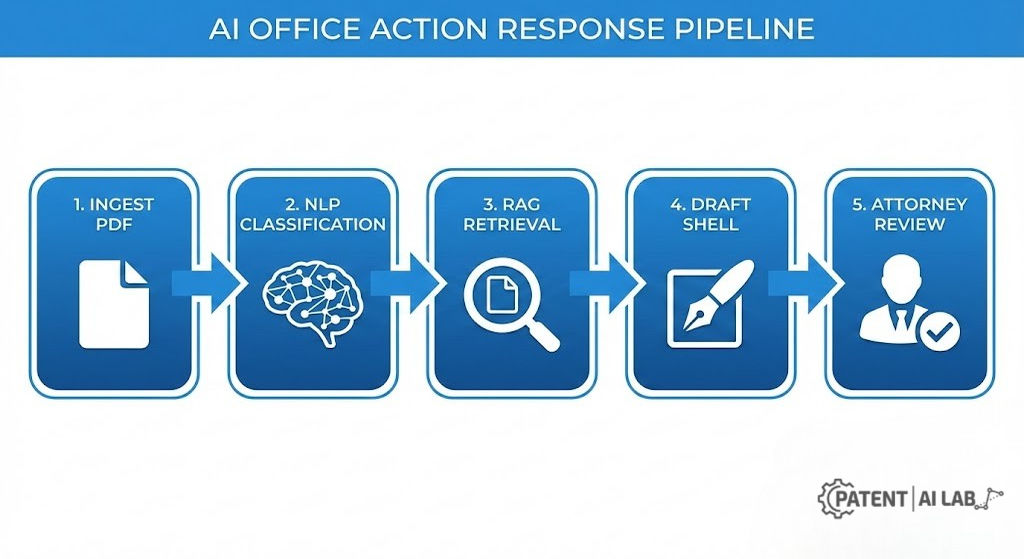
- The Workflow: Office action automation is not a magic button. It is a pipeline: OA intake to claim mapping to argument drafting to quality checks to filing.
- Strategy Split: For Section 102 (novelty), tools like ClaimMaster and PatentSolve win through precise element mapping. For Section 103 (obviousness), tools like Arguminer win by retrieving precedent-backed argument patterns.
- The Verdict: Firms running high office action volume tend to get the most out of Juristat OAR, which reports generating more than 40,000 OA shells a year across dozens of firms. Solo practitioners often do better with a lighter, seat-based stack such as ClaimMaster or PatentSolve, both of which publish self-serve, per-user pricing rather than requiring a sales call.
- Data Safety: Feeding unpublished claims into generic consumer LLMs like ChatGPT’s free tier raises real confidentiality concerns. Verify “Zero-Retention” data policies with any legal tech vendor before uploading anything client-confidential.

Where Office Action Budgets Actually Disappear
Patent office actions are the exact point in the prosecution lifecycle where budgets evaporate. Under USPTO examination procedure, responses must generally be filed within a three-month statutory window (extendable to six months with fees), and corporate pressure to eliminate non-billable administrative hours has never been higher.
Historically, attorneys burned hours manually downloading documents, formatting Word templates, and transcribing examiner rejections. That administrative drag is measurable, not anecdotal: one Juristat client, Patterson Thuente IP, reported saving 30 to 60 minutes on average per case after automating shell generation, a figure the firm’s marketing team described as easily quantifiable from the outset. Multiply that across a firm handling hundreds of office actions a year, and the case for automation stops being theoretical.
USPTO office action automation now compresses that administrative phase significantly by handling three core mechanical tasks before an attorney ever opens the file:
- Extracts rejections by statute (Section 101, 102, or 103).
- Identifies affected claims and specific limitations quickly.
- Retrieves and structures cited prior art automatically.
- Builds a clean response shell ready for attorney review.
This shift changes what a patent attorney spends their time doing: less document formatting, more of the substantive legal analysis an examiner actually responds to. A law firm case study on Quarles & Brady’s deployment of Juristat OAR frames the shift in exactly those terms, describing the goal as freeing staff for billable work rather than repetitive data entry.
Responding to these actions is the hurdle that arrives 12 to 18 months after filing a provisional patent without counsel. That linked guide is background reading only; it does not cover office action prosecution, examiner rejections, or claim strategy, and it is not a substitute for retaining a registered patent attorney or agent. If you filed without counsel and now have an active USPTO deadline, that is generally the point at which speaking with a registered patent attorney or agent stops being optional.
The Tech Stack Behind Automated Office Action Response Software
Understanding the underlying technology is a prerequisite for selecting the right vendor. Most patent prosecution copilot tools share a centralized technical architecture built around three layers.
1. Document Ingestion and OCR
The software pulls PDFs directly from the USPTO Patent Center. Because examiner output has inconsistent formatting and visual artifacts, Optical Character Recognition (OCR) is used to normalize this text into structured data the rest of the pipeline can parse. This step matters more than it looks: vendor documentation on OCR handling notes that direct text-based PDFs pulled straight from Patent Center consistently yield more accurate downstream analysis than scanned copies, even when OCR is applied to both, since scan artifacts can propagate errors into the rejection-classification step that follows.
2. Rejection Classification (NLP)
Natural Language Processing (NLP) models parse the examiner’s unstructured arguments. The system maps paragraphs into distinct legal buckets:
- Section 102 (Anticipation): Flags direct prior art overlap.
- Section 103 (Obviousness): Flags impermissible combinations of references.
- Section 112 (Written Description): Flags clarity or specification support failures.
Coverage depth varies by vendor here. Some platforms stop at the three rejection types above; others extend further. PatentSolve’s own documentation, for instance, states it classifies Section 101 (Alice/Mayo eligibility), 102, 103, 112(a) and 112(b) separately, plus double patenting and restriction requirements, which is a materially wider net than a tool that only handles novelty and obviousness. If your docket includes a meaningful share of Alice-type Section 101 rejections in software or AI-adjacent art units, that classification breadth is worth checking directly against the vendor’s current feature list before you commit to a platform, since coverage changes as products update.
3. Retrieval-Augmented Generation (RAG) and Citation Verification
This is the core utility of generative AI for patent law. Rather than generating legal theories from scratch, the AI is constrained to analyze the specific specification, the cited prior art texts, and a closed database of successful historical arguments. This grounding is what keeps legal hallucination risks in check, and it is where vendor implementations diverge most.
The stronger implementations treat citation verification as a distinct, checkable step rather than trusting the model’s output. PatentSolve’s help documentation describes this explicitly: every citation is checked against the actual source before the attorney sees it, meaning MPEP section numbers are checked against the current manual, prior art quotes are matched against the patent text, and case law is validated against a reference database. If a citation cannot be verified, the vendor states it is flagged for review rather than silently included. That flag-don’t-hide behavior is a meaningfully better default than a tool that simply presents generated text without indicating its own confidence in a citation’s accuracy, and it is worth asking any vendor directly whether their platform behaves the same way before you rely on it.
Evaluating AI Tools for USPTO Office Action Responses: Four Platforms Compared
The market has a lot of thin wrappers around general-purpose LLMs. The four platforms below have specific, verifiable capabilities, documented directly on each vendor’s site, that distinguish them from that category.
1. Juristat OAR: Built for Firm-Wide Volume
Target Profile: Large law firms and corporate in-house teams.
Juristat OAR’s design in 2026 centers on volume scaling and operational leverage across a firm’s full prosecution docket. This is not a boutique tool: the vendor’s own product page states that OAR generates more than 40,000 OA shells per year for dozens of law firms and in-house teams worldwide, which gives it a scale of real-world deployment that smaller, newer entrants in this category have not yet demonstrated publicly.
- Core Strength: End-to-end procedural automation. It drafts the shell and layers in examiner-behavior analytics pulled from historical prosecution data.
- Workflow: Automated packet generation. Juristat connects directly to USPTO data to generate a response shell, and delivers the cited art documents alongside an examiner analytics report as one packet, typically within three business days of the OA issuing, according to the vendor’s press materials.
- Pricing Reality: Juristat’s published pricing page is quote-based rather than listing a flat per-office-action or seat rate; the vendor asks prospective customers to request a custom quote scaled to firm volume. Third-party estimates for legacy per-OA pricing circulate online, but none of them are confirmed on Juristat’s own site, so treat any specific dollar figure you see quoted for Juristat OAR as unverified unless it comes directly from your own sales conversation with the vendor.
- Verdict: For firms that need formatting and quality consistency across a large attorney roster, and that want a vendor with a long, documented deployment history, this is a strong fit. A published case study on Quarles & Brady’s use of Juristat OAR is a useful reference point for what a mid-to-large firm rollout looks like in practice.
2. ClaimMaster: Precision Inside Microsoft Word
Target Profile: Solo practitioners and boutique firms.
ClaimMaster functions as a Swiss Army Knife of patent tools, and it runs directly inside Microsoft Word rather than a separate web portal, which means documents never leave the practitioner’s own machine for the core proofreading functions.
- Core Strength: Claim chart automation and aggressive error checking. It maps claim elements precisely, which makes it particularly effective at dismantling Section 102 rejections and catching antecedent basis problems before they reach an examiner.
- The Hybrid Power: ClaimMaster integrates with local or cloud-based large language models to inject generative text directly into your Word document, fusing procedural automation with generative drafting. The vendor’s own FAQ documentation describes this as general LLM support rather than a named exclusive partnership with a specific model provider, so confirm current integration options directly with ClaimMaster before assuming a particular vendor is supported.
- Pricing Reality: Unlike Juristat, ClaimMaster publishes its pricing structure openly rather than gating it behind a sales call. According to the vendor’s own order page, licensing is seat-based, each user requires a licensed seat, pricing scales automatically with the quantity selected at checkout, and volume discounts apply for larger orders. A 30-day free trial is available before purchase.
- Verdict: The strongest fit for hands-on practitioners who want total architectural control over the document and transparent, self-serve pricing without a procurement cycle.
3. PatentSolve: Citation-Verified Drafting in the Browser
Target Profile: Solo practitioners through mid-size firms that want a browser-based, citation-checked alternative to a Word add-in.
PatentSolve is a newer entrant in this category, built specifically around the office action response workflow rather than the broader IP portfolio management some competitors also handle. Where it distinguishes itself is citation discipline: the platform is built to verify every MPEP section, case law citation, and prior art reference against source material before presenting it, and to flag anything it cannot verify rather than including it silently.
- Core Strength: Rejection-type breadth combined with verified citations. The vendor’s site states it supports Section 101 (Alice/Mayo eligibility), 102 (element-by-element mapping), 103 (motivation-to-combine analysis), 112(a), 112(b), and double patenting, which is a wider rejection-type net than a tool scoped only to novelty and obviousness.
- Workflow: Upload the office action PDF (scanned or text-based; the platform applies OCR automatically to scans), and the vendor states most analyses complete within a few minutes, producing a claim-by-claim rejection breakdown, examiner intelligence data, and a draft response with 37 CFR 1.121-formatted claim amendments ready for export to Word. The vendor’s own documentation estimates this workflow typically adds 30 to 60 minutes of attorney review time to the AI draft, not zero, positioning the tool explicitly as a first-draft accelerator rather than a filing-ready output.
- Pricing Reality: PatentSolve publishes self-serve pricing with a free first matter, according to the vendor’s own product documentation, meaning a practitioner can evaluate the full workflow on a real office action before committing to a paid plan. Current tier pricing should be confirmed on the vendor’s site directly, since self-serve SaaS pricing changes more frequently than enterprise quote-based models.
- Verdict: A strong option for practitioners who want browser-based access, explicit citation verification as a stated design principle, and a low-commitment way to test the tool against their own docket before paying for it.
4. Arguminer: Argument Retrieval, Not Argument Invention
Note: Sometimes misreferenced online as “Arguman.ai,” the actual product is Arguminer, built by IP Toolworks.
Target Profile: Strategic argumentation (Section 103 defense).
- Core Strength: It doesn’t generate text from a blank page; it retrieves precedent. You upload an OA, and the software searches a large database of past office action responses to locate arguments that previously succeeded against similar rejections, ideally from the same examiner or Art Unit.
- Verdict: An AI patent argument generator anchored in real precedent, which makes it especially useful for the more subjective terrain of obviousness rejections.
102 vs. 103: Why the Same AI Prompt Won’t Work for Both
Using an identical AI prompt for every rejection type tends to produce shallow results regardless of vendor. The strategy needs to adapt to the statute, and the underlying legal test is different enough between novelty and obviousness that a single generic prompt structure will systematically underperform on one or the other.
Handling Section 102 (Novelty) Rejections with Automation
A Section 102 rejection asserts that a single prior art reference discloses every element of your claimed invention. Because the test is binary, element-by-element disclosure, this is the rejection type where AI automation adds the most reliable value with the least interpretive risk.
- The AI Task: Mechanical fact-checking.
- Best Workflow: Use ClaimMaster or PatentSolve to auto-generate a limitation chart, then have it parse the cited reference and check whether the examiner’s specific cited paragraph explicitly discloses the claimed element.
- Success Metric: Precision. Confirm whether the prior art explicitly discloses, for example, “dynamic load balancing,” or whether the examiner is stretching a definition to make it fit.
Section 102 rejections often surface prior art you missed during initial drafting. A thorough hidden prior art search with AI before filing helps reduce that exposure in future applications. As with any AI-assisted search, the results still need a practitioner’s review before they inform filing decisions.
Overcoming Section 103 (Obviousness) Rejections with AI
This is the most subjective and unpredictable phase of prosecution. The examiner builds a hybrid by combining Reference A with Reference B, and the strength of a traversal argument often turns on facts specific to the technology rather than a formula an AI model can apply mechanically.
- The AI Task: Logical deconstruction and reasoning.
- Best Workflow: Use Arguminer or a carefully scoped LLM (such as PatentSolve’s motivation-to-combine analysis or a general-purpose model like Claude) to brainstorm traversal strategies:
- Teaching Away: Does Reference A specifically instruct the reader to avoid the mechanism used in Reference B?
- Missing Motivation: Is there a legitimate technical reason to combine these references, or is the examiner relying on impermissible hindsight?
- Objective Indicia: Have the AI pull arguments regarding commercial success or long-felt need directly from your specification.
🎯 Clear Example (103 Obviousness)
Scenario: The Examiner combines “LLM text generation” (Ref A) with “Static Code Analysis” (Ref B).
Sample AI-Assisted Argument: “Reference B does not teach validating generated code using vector embeddings. Modifying Reference A with Reference B undermines the primary function of A (latency optimization) by introducing the processing overhead of B, which supports a ‘teaching away’ argument against the proposed combination.” This is a starting point for attorney refinement, not a finished argument; the examiner’s actual claim language and the references’ full disclosures still need direct review.
Features and Capabilities Compared
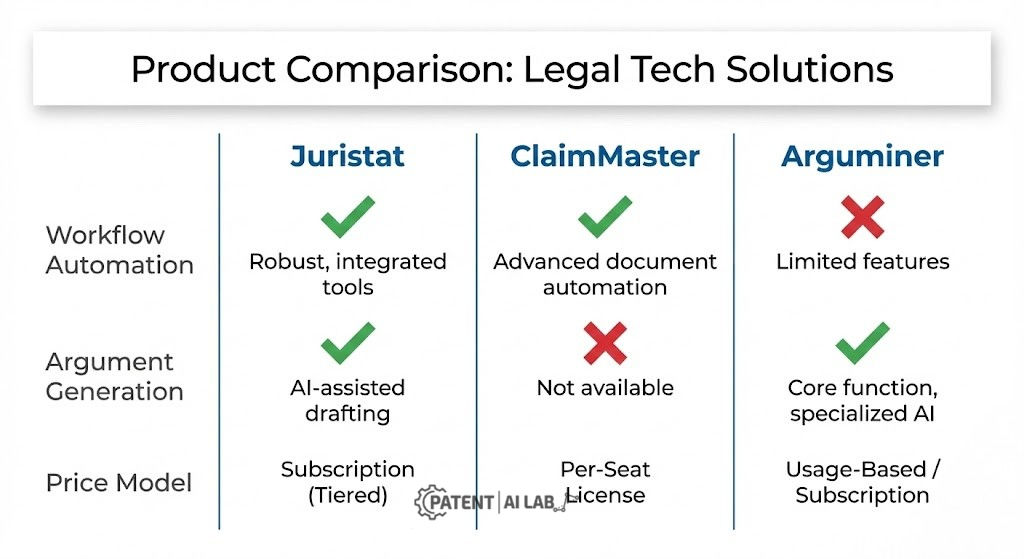
| Feature | Arguminer | Juristat OAR | ClaimMaster | PatentSolve |
|---|---|---|---|---|
| Core Superpower | Finding proven precedent arguments | Firm-wide scale and workflow automation | MS Word integration and precision | Browser-based drafting with verified citations |
| OA Intake | Upload PDF | Direct from Patent Center data | Direct from Patent Center data | Upload PDF, scanned or text-based, auto-OCR |
| Rejection Types Covered | 102, 103 | 101, 102, 103, 112 | 102, 112(b), formal/numbering issues | 101 (Alice/Mayo), 102, 103, 112(a), 112(b), double patenting |
| 102 Handling | Medium | Good | Excellent (strict claim charts) | Excellent (element-by-element mapping) |
| 103 Handling | Excellent (pattern based) | Good | Good (generative prompting via LLM integration) | Good (motivation-to-combine analysis) |
| Citation Verification | Precedent-anchored by design | Standardized packet formatting | User-controlled (local processing) | Explicit: flags any citation it cannot verify |
| Pricing Model | Subscription | Custom quote, scaled to volume | Seat-based subscription, published pricing, 30-day trial | Self-serve, free first matter, published pricing |
📊 Where Each Tool Fits Best
These ratings reflect Patent AI Lab’s editorial assessment based on the feature comparison above and the vendor-published data cited throughout this article, not a third-party benchmark or a paid vendor placement.
Keeping AI-Assisted Filings Compliant with USPTO Rules
Deploying automation software does not exempt anyone from federal compliance obligations. It can amplify liability if mismanaged, and the governing guidance on this point is specific rather than general best practice.
- Section 101 (Eligibility): The USPTO’s 2024 Guidance Update on Patent Subject Matter Eligibility, Including on Artificial Intelligence, effective July 17, 2024, is the operative framework here. When automated tools generate Section 101 arguments, those arguments need to tie the claims to a tangible “practical application,” consistent with the guidance’s Step 2A analysis. Purely theoretical or abstract framing invites rejection.
- The Signature and Verification Rule: Under 37 CFR 1.4(d) and 11.18(b), only a registered practitioner or applicant can sign a document filed with the USPTO, and that signature certifies a reasonable inquiry into the paper’s accuracy. The USPTO’s April 2024 Guidance on Use of Artificial Intelligence-Based Tools in Practice Before the USPTO is explicit that simply relying on an AI tool’s output does not, by itself, satisfy the reasonable-inquiry standard. An AI tool cannot insert that signature, and a fully autonomous submission pipeline with no practitioner review would run directly into this requirement, not just into general best practice.
Legal Hallucination Risks Worth Watching For
Without careful constraints, AI platforms can generate errors that carry real consequences. This is not a hypothetical concern raised only by critics of AI tooling; it is acknowledged directly in vendor documentation for tools built for this exact use case. PatentSolve’s own help center, for example, names hallucination explicitly, describing it as AI models sometimes generating citations that sound plausible but do not exist, which is precisely why the platform builds a separate verification pass around every citation rather than trusting the drafting model’s output at face value.
The failure modes worth watching for span three categories:
- Fabricated case law citations.
- Inaccurate technical teachings falsely attributed to prior art.
- Failure to track claim status (arguing canceled claims).
For anyone evaluating vendors, tools that build in citation verification as a stated design principle, not just a marketing claim, are worth prioritizing. Concretely, that means asking each vendor: what happens when the AI generates a citation it cannot verify against source material? A tool that flags the gap for review is a materially different risk profile than one that presents every generated citation with equal confidence.
Matching the Right Stack to Your Firm Size
For Large Firms with High-Volume Dockets
Recommendation: Juristat OAR.
Enterprise ROI depends heavily on workflow standardization. If automation saves even the 30-to-60-minute range one Juristat client reported per case across a large attorney roster, the firm recovers substantial billable bandwidth over a year of filings. Juristat’s analytics interface also lets managing partners factor attorney-to-examiner assignment into strategy based on historical success patterns, which is a capability that is harder to replicate with a single-purpose drafting tool.
For Solo Practitioners and Boutiques
Recommendation: ClaimMaster or PatentSolve, depending on whether you want a Word-native or browser-native workflow.
If your practice already lives inside Microsoft Word and you want the procedural mechanics (shells, limitation charts, mechanical proofreading) handled locally with a transparent per-seat price, ClaimMaster’s published, quantity-based pricing removes the friction of a sales cycle. If you would rather work in a browser with citation verification built into the drafting step itself and a lower-commitment way to test the tool against a real office action before paying, PatentSolve’s free-first-matter model serves that use case directly. Both are meaningfully lighter commitments than an enterprise Juristat contract, and either pairs well with a carefully scoped LLM for Section 103 argument brainstorming, provided the underlying facts and citations are verified against the actual record before filing.
Do These Tools Work for UKIPO Examination Reports?
Short answer: not particularly well, at least not yet.
- Why: The vast majority of legal tech for patent attorneys is engineered around the USPTO, prioritizing integration with the USPTO Patent Center API ecosystem specifically. None of the four tools reviewed above advertise native UKIPO integration.
- The Nuance: USPTO rejections follow a fairly rigid mechanical structure that AI parses reliably. UKIPO reports frequently use narrative “technical contribution” evaluations, which current LLMs handle with noticeably less consistency, since there is less structured training and verification data built around that specific examination format. If your practice is heavily UK-based, treat these tools as rough draft accelerators rather than dependable legal engines, and verify any UK-specific claims a vendor makes directly with their support team rather than assuming USPTO-grade reliability carries over.
Where This Leaves You
Manually formatting office action responses is increasingly optional. The competitive edge now comes from how effectively a firm orchestrates its AI infrastructure.
- Best for Volume: Juristat OAR (dominates procedural automation at documented firm-wide scale).
- Best for Strategy: Arguminer (retrieves verifiable, precedent-backed logic).
- Best for Word-Native Drafting: ClaimMaster (produces structurally clean documents with transparent per-seat pricing).
- Best for Citation Trust: PatentSolve (verifies every citation against source before display, flags what it cannot confirm).
The goal isn’t just surviving an examiner’s rejection. It’s securing claims durable enough to withstand post-grant litigation, where the stakes escalate considerably. Even a strong jury verdict can unravel on appeal, which is exactly what happened in Sonos vs. Google: after a $32.5 million jury verdict for Sonos, the district court initially threw out the win on prosecution laches and written description grounds, only for the Federal Circuit to reverse that ruling in a nonprecedential decision issued August 28, 2025, restoring the enforceability of Sonos’s Zone Scene patents. Google separately prevailed on a different Sonos patent, which the court affirmed invalid as obvious. Years of litigation later, neither side had a clean, uncomplicated win. That is the more accurate lesson for prosecution strategy: durable claims are built by getting the record right the first time, not by hoping a favorable outcome survives appeal unchanged.
Final Thought: Instead of searching for one AI tool that handles 100% of the job, look for software that removes the bulk of the administrative drudgery so attorneys can focus their time on the legal strategy that actually secures the patent grant.
Podcast
Note: This audio is a condensed intelligence brief. Please review the software matrices above for granular tool capabilities and technical workarounds.
FAQs
What’s the fastest way to draft an office action response?
The fastest operational method utilizes an OA shell generator like Juristat, ClaimMaster, or PatentSolve. These tools hook directly into the USPTO Patent Center API or accept a direct PDF upload, extract the raw data, and auto-populate a structured shell with validated headers, claim statuses, and rejection summaries within minutes.
Which AI tool actually helps with obviousness rejections?
Arguminer is the standard for this specific challenge. Rather than generating legal text from a blank page, it queries a database of successful past responses to locate argument patterns that have historically persuaded the exact examiner or Art Unit you are facing. PatentSolve’s motivation-to-combine analysis is a browser-based alternative worth evaluating for the same rejection type.
Can AI file a patent response without a lawyer checking it first?
No. Under 37 CFR 1.4(d) and 11.18(b) and the USPTO’s April 2024 guidance on AI-based tools, only a registered practitioner can sign a filed document, and that signature certifies a reasonable inquiry that relying on an AI tool’s output alone does not satisfy. A registered practitioner must manually review all AI-generated output for factual accuracy, legal viability, and MPEP compliance before filing.
Is it safe to upload an unpublished invention to these tools?
Safety depends entirely on the vendor’s data policy, and this should be confirmed directly with each vendor rather than assumed. Look specifically for a stated Zero-Retention or non-training data policy in the vendor’s own documentation before uploading unpublished claims to any generative AI tool.
How much do Juristat, ClaimMaster, and PatentSolve actually cost?
Juristat OAR pricing is quote-based rather than publicly listed; the vendor scales pricing to a firm’s prosecution volume and asks prospective customers to request a custom quote. ClaimMaster and PatentSolve both publish self-serve, per-seat or per-matter pricing directly on their sites, with free trial options, making them easier to evaluate without a sales call.
Sources and Legal References
The commercial software architectures and federal compliance standards detailed in this technical review are sourced directly from the vendors and USPTO/Federal Circuit primary sources:
-
1. USPTO Guidance on Use of Artificial Intelligence-Based Tools in Practice Before the USPTO
The federal guidance, effective April 11, 2024, outlining the signature, certification, and duty-of-candor requirements that apply when AI tools assist in preparing USPTO filings.
Review USPTO AI Practice Guidance -
2. 2024 Guidance Update on Patent Subject Matter Eligibility, Including on Artificial Intelligence
The Federal Register notice, effective July 17, 2024, governing how Section 101 eligibility analysis applies to AI-related claims.
Review Federal Register Notice -
3. Juristat OAR Product Documentation and Case Studies
Details the firm-wide integration protocols, 40,000+ annual OA shell volume, and examiner analytics used to automate procedural shell generation, plus a published Quarles & Brady case study.
Review Juristat Platform -
4. ClaimMaster Software Documentation and Pricing
Validates the MS Word-native claim mapping mechanics, LLM integration options, and published seat-based pricing structure used for hybrid drafting.
Review ClaimMaster Tools -
5. PatentSolve Product Documentation
Details the rejection-type coverage (101/102/103/112/double patenting), citation verification workflow, and self-serve pricing model.
Review PatentSolve Platform -
6. Google LLC v. Sonos, Inc., No. 24-1097 (Fed. Cir. Aug. 28, 2025)
The Federal Circuit’s nonprecedential opinion reversing the district court’s prosecution laches finding and reinstating enforceability of Sonos’s Zone Scene patents, while separately affirming invalidity of a different Sonos patent.
Review Federal Circuit Opinion
Disclaimer & Legal Notice
This article reflects the author’s analytical perspective evaluating enterprise intellectual property software, patent prosecution automation workflows, and USPTO examination frameworks. It is intended strictly for informational and strategic purposes and does not constitute formal legal advisory services. It is not a substitute for the counsel of a qualified, licensed intellectual property attorney. Patent eligibility standards and USPTO rules regarding AI utilization change frequently. Always consult certified legal counsel before deploying AI tools on unpublished intellectual property or initiating patent prosecution.



Add comment